
Skip to content
Claritask × Claritick
Claritask Claritick

Support and delivery,
finally in one loop.

Claritick answers the customer. Claritask gets the work done. Connect them once and a ticket becomes a real task, in the right project, with the right people, and every status, comment and file keeps flowing both ways on its own.

Included on every Claritask plan · no add-on fee · set up in minutes

Two-way Statuses, comments and files move in both directions
One click Turn a customer ticket into a real task, nothing retyped
Zero Spreadsheets, screenshots or "did anyone see this?" messages
Two jobs, two tools

One is the front door. One is the workshop.

They were never meant to be the same product, and they were never meant to be strangers either. Here is who does what, and where they meet.

The front door

Claritick holds the conversation

Every customer request lands here as a ticket, with the full thread, the attachments, the priority and the promise you made about when it will be fixed.

  • Tickets from customers, with the whole email trail
  • Priorities and ticket statuses your support team owns
  • Attachments, screenshots and logs from the reporter
  • The record you point the customer back to
The workshop

Claritask does the work

The ticket becomes a task in the project that actually owns it, with assignees, estimates, a board column, tracked hours and a budget it counts against.

  • Projects, boards and sprints that fit your team
  • Assignees, due dates, subtasks and checklists
  • Time tracked on the task and rolled into timesheets
  • Internal discussion the customer never has to read

Support keeps its inbox. Delivery keeps its board. The connection is what stops the same job being written down twice.

Step by step

From "a customer wrote in" to "it's done."

Six steps, and only the first one is setup. Click a step to jump to it, or let it play.

Setup · once

Link a Claritask company to Claritick

Claritick's App Market with the Claritask app open: overview, plans and the Install button.
A signed key is issued for that company. Every request between the platforms carries it, and it only ever unlocks the one company you picked. Revoke it from either side and the sync stops immediately.
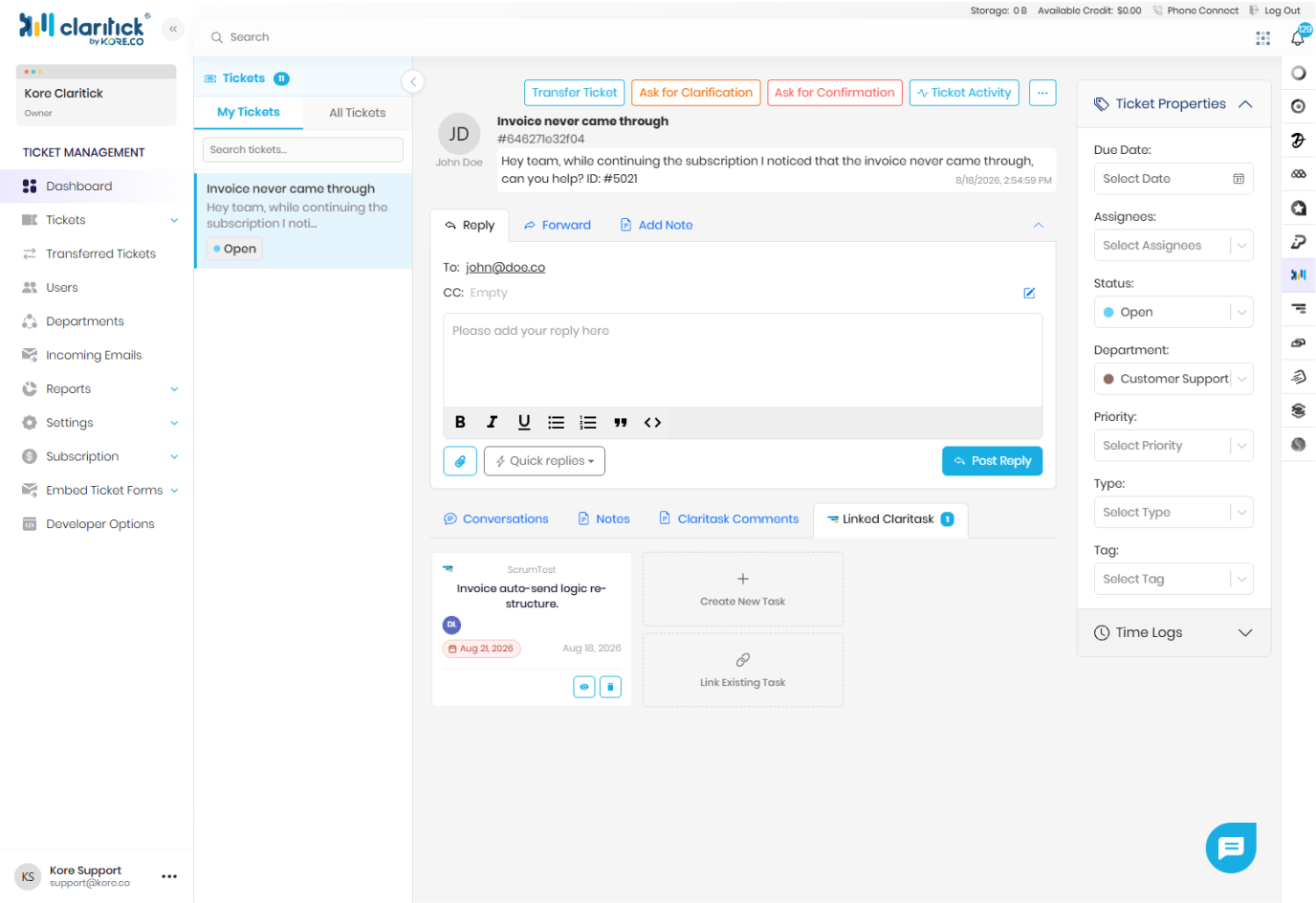
In Claritick

A customer reports a problem

A ticket open in Claritick: the customer's message, the reply box, and the ticket properties panel.
Nothing has reached Claritask yet. Support triages first. Not every ticket needs engineering, and the ones that don't never clutter your board.
Claritick → Claritask

Turn the ticket into work

The Create task panel inside a Claritick ticket: task name, workspace, project and assignee.
The task is created by a dedicated Claritick system user, so it is always obvious which work came from a customer and which came from your own planning.
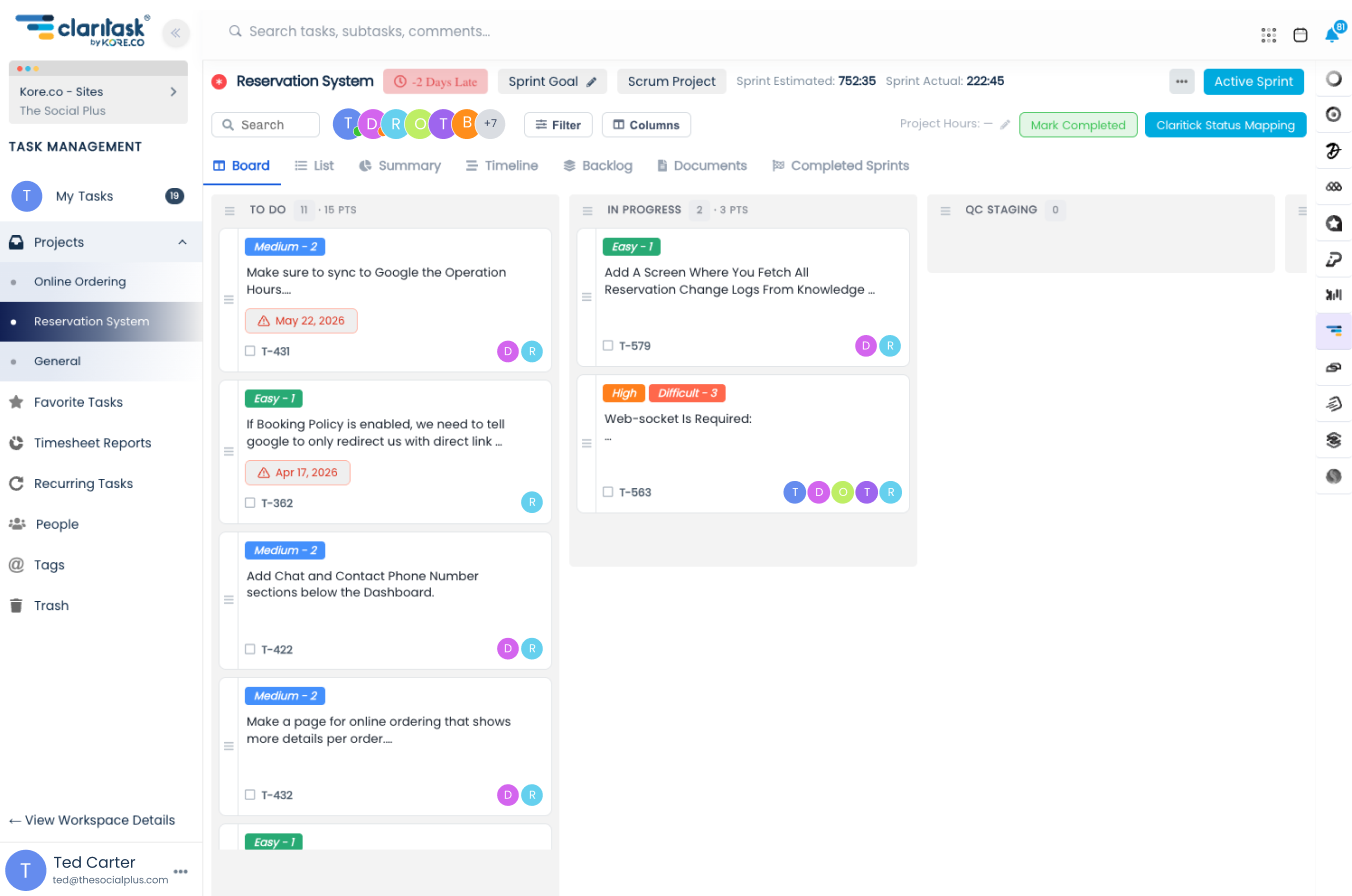
In Claritask

The right people hear about it

The linked task in Claritask with the Claritick System notes, assignees and followers.
Nobody has to watch the support inbox. Assignment notifications reach the people who will actually do the work, in the app, by push, and by email.
Claritask → Claritick

Move the card, update the customer

The board column changes and the Claritick ticket status follows it.
You decide how loud this is. Map a board column to a ticket status and the ticket moves too. Leave it unmapped and Claritask only posts the note, without touching what the customer sees.
The exact contract

What flows, and which way it flows.

No mystery sync. This is the whole list of what one platform tells the other.

Claritick Direction Claritask
A new ticketSubject, description, due date and the customer's own words creates A task in a chosen projectIn the workspace, project and list your support team picked
Ticket attachmentsScreenshots, logs and documents the customer sent copies Task attachmentsOff by default, switchable per task
Ticket status changesOpen, In Progress, Need Confirmation, and the rest of your ladder comments A comment on every linked taskPosted on the task timeline, followers notified
Ticket opened or closedThe two events that decide whether work is live moves Linked tasks jump columnTo the first column when reopened, to the completion column when closed
The ticket status is mirrored onto the taskSo Claritask knows whether the customer is still waiting guards "Mark complete" is blockedWith a message naming the ticket that is still open
A note lands on the ticketNaming the task, the old status, the new one and who moved it reports Any task status changeBoard drag, sprint move, or the status dropdown
The ticket status is set for youOnly where you connected that column, never for "Closed" maps Your connected board columnsSet once per project, applies to every ticket-linked task in it
Connect statuses

Your columns, their statuses, your rules.

Support and delivery rarely use the same words. Map them once per project and both sides keep speaking their own language.

Connect statuses · Website
Claritask status
To Do
In Progress
QC Production馃敀 locked
Donecompletion
maps
to
Claritick status
Open
In Progress
Need Confirmation
Closednot mappable

Every non-completion column in the project gets a row. Pick a ticket status, or leave it blank.

Leave a row empty and nothing changes for the customer

The task still posts its note on the ticket, so support can see the work is moving, but the ticket status stays exactly where your support team put it.

Production columns always mean "Need Confirmation"

Any column whose name contains "prod" is wired to the Need Confirmation status and can't be changed. Shipped is not the same as accepted, and the customer gets the last word.

"Closed" can never be set from the board

Closing a ticket is a support decision, so it is deliberately missing from the dropdown. Delivery can take a ticket all the way to Need Confirmation and no further.

Mapping is per project, not global

A support-heavy project can mirror every step. An internal project can post notes and nothing else. Same workspace, different noise levels.

Files

The screenshot the customer sent is already on the task.

One switch, per task. Flip it on and the ticket's attachments appear on the task. Flip it off and the synced copies are cleaned up, your own uploads are never touched.

New ticket files keep arriving

Anything the customer adds later shows up on the task too, for as long as the switch stays on. No one has to go back and re-download it.

Turning it off cleans up after itself

Only the files that came from the ticket are removed. The design mockup your teammate uploaded to the task stays right where it is.

Every synced file is labelled

Files carry a "from ticket" badge on the task, so nobody wonders whether a log came from the customer or from your own QA run.

Attachments on the Claritask task
TXT error-log.txt42 KB · uploaded by [email protected] from ticket
PNG checkout-safari.png1.2 MB · uploaded by [email protected] from ticket
PDF order-4821.pdf310 KB · added to the ticket later from ticket
Sync is off · only files your team uploads live here

The switch above is live, try it.

Notifications & email

Nobody has to refresh anything.

Every step of the loop announces itself, in the app, on your phone, and in your inbox, always with a link straight to the thing that changed.

Claritask notifications live

Followers of a task get every ticket event on it. Mute a task and the noise stops, the sync doesn't.

Ticket #4821 was updated on your task Claritask <[email protected]> · to you · 10:02

Hi Sara, the customer ticket behind one of your tasks just changed status.

Checkout fails on Safari 17
Website · Sprint 12 · assigned to you
Ticket #4821: In Progress → Need Confirmation
Open the task

You are receiving this because you follow this task. Manage your notification preferences in your Claritask profile.

Inside the task

The ticket lives in the sidebar, not in someone's memory.

Open any linked task and the customer's ticket is right there, one click away, with its own controls.

Product Team · Website · Sprint 12

Checkout fails on Safari 17

High Priority Claritick Est 4:00 · 2:15 logged

Customers on Safari 17 can't complete the payment step. Console shows a blocked third-party cookie on the payment iframe. Reported by Acme Co. with a log and a screenshot attached.

Claritick: ticket status changed from Open to In Progress.

S

Reproduced. It's the cookie policy on the iframe, patch going up this afternoon.

Status
In Progress
Claritick Ticket #4821
Sync ticket files3 files synced
Ticket #4821 is still open. This task will move to Done on its own once support closes it.

Unlink at any time. The task, its comments and its logged hours all stay, only the connection goes away.

A real Tuesday

One bug, eight hours, nothing retyped.

The same ticket, followed from the customer's first email to the moment it's closed.

Maria at Acme emails support

"Checkout fails on Safari." Claritick opens ticket #4821, attaches her console log and screenshot, and flags it High priority against Acme's SLA.

Support sends it to engineering

Two minutes of triage, then one dialog: Product Team → Website → due Friday. A task is created in Claritask with the ticket text, the due date and both attachments already on it.

Sara and Ben are notified

Push on their phones, a card in their notification tray, and an email each, all pointing at the same task. Neither of them has a Claritick login, and neither of them needs one.

Sara starts the timer and moves the card

To Do → In Progress. Claritask posts a note on the ticket naming the task, both statuses and Sara, and the mapping flips the ticket to In Progress. Support sees the customer is being handled without asking anyone.

Fix shipped, card dropped in QC Production

Because the column name contains "prod", the ticket is automatically set to Need Confirmation, and support emails Maria to verify. 4:05 of tracked time is already sitting on Acme's budget.

Maria confirms, support closes the ticket

The linked task moves itself into the completion column and a closing note lands on its timeline. Nobody in engineering had to remember to tick it off.

Total handovers where something could have been lost: zero.

Yours to control

Connected, not fused.

A connection you can inspect, narrow, and pull apart, without losing a single hour of work.

Signed on every hop

Each request between the platforms carries a shared secret key. An unsigned call is rejected outright, no matter where it came from.

Scoped to one company

The connection unlocks exactly the company it was issued for. Workspaces, projects and tasks outside it are invisible to the integration.

Unlink at any level

Drop the link on a single task, on a single ticket, or disconnect the whole company. Everything you built in Claritask stays untouched.

Every automatic action is written down

System comments, timeline entries and the Claritick system user make it obvious what the integration did, when, and to which task.

Who this is for

If support and delivery are two different teams, this is for you.

Agencies with retainers

Client requests arrive as tickets, land as tasks on the right retainer project, and the hours you log against them count straight into that client's budget.

Product teams with a support desk

Bug reports become sprint items with estimates, and support can see exactly which sprint a customer's problem is sitting in, without a standup invite.

Internal IT & operations

Staff raise tickets, IT plans the real work on a board, and the requester still gets their answer on the ticket they opened.

Anyone tired of double entry

If someone on your team currently copies a ticket into a task by hand every morning, that job disappears the day you connect the two.

FAQ

We've Got Answers.

No. Claritask is complete on its own. Claritick is a separate ticketing platform from the same family, and the integration is there for teams that run customer support and delivery side by side. Turn it on only if you use both.

An owner starts the connection from Claritick with the email that owns both accounts. We email that address the list of Claritask companies it can manage, you pick the right one, and a signed connection key is issued for that company. Nothing syncs until that key exists, and you can revoke it at any time.

No. A ticket can create one task or be linked to several existing tasks across different projects, and a single task can be worked on by your whole team while the ticket stays the customer-facing record. Status notes and file syncs reach every linked task.

They stay exactly where they are. Unlinking removes the connection between a task and its ticket, not the task, its comments, its logged hours, or its history. Files that were synced from the ticket are cleaned up so you are not left with orphan copies.

Not by accident, and that is the point. If the linked ticket is still open, Claritask blocks the manual "mark complete" and tells you why. Close or resolve the ticket, and the linked tasks move to Done on their own.

Not at all. Claritask is free forever for up to 2 users, and scales from a two-person studio to companies running many workspaces and teams, you only ever pay $3/month per user.

For $7 you get 7 days of full access plus real onboarding help from our team via email, phone, and video. The $7 is credited toward your first month, and you can cancel before the trial ends, no questions asked.

Yes. Roles like Admin, Staff, and Client control exactly what each person sees. Clients get visibility into their own projects and budgets, nothing else.

For most teams, yes. Time is tracked directly on tasks, rolled into timesheets by person, task, category, or day, and exported to PDF or Excel, no separate tracker needed.

Deleted tasks, lists, projects, and files go to the Trash, where they can be recovered for 30 days before being permanently removed.

Yes. Claritask works as a progressive web app and has a mobile app with push notifications for assignments, mentions, due dates, and more.

Yes. There are no long-term contracts. Billing is pro-rated per user, and you can cancel on your own from your company settings at any time.

Close the loop between your customers and your team.

Start free with 2 users. Connect Claritick whenever you're ready, it's included on every plan.